Epoch 12 – Custom Tag
Custom tag for layout.
Epoch 12 – Custom Tag
1. Create Custom Tag “Layout”
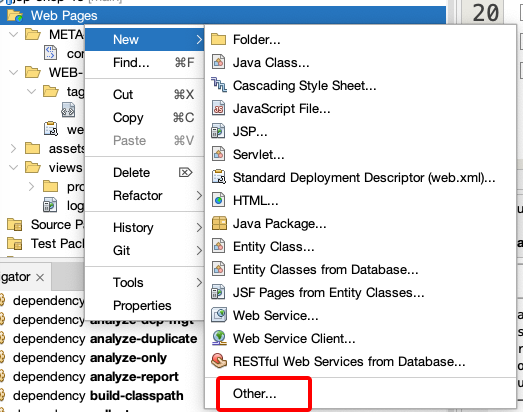
- Right mouse “Web Pages” => New => Other
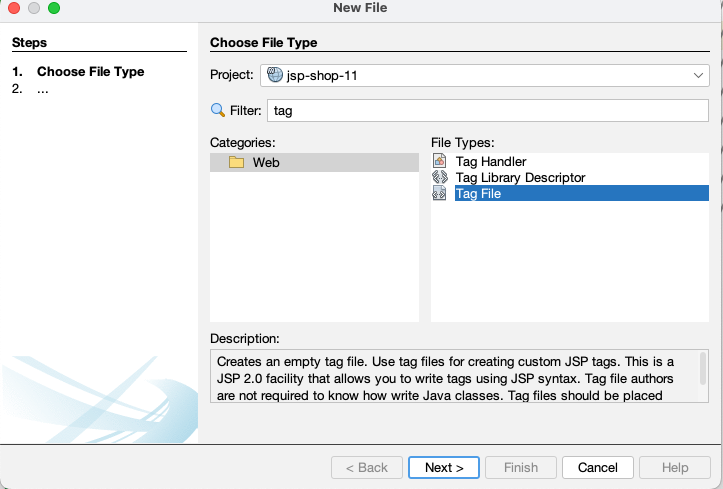
- In New Form => Filter “tag” => Tag file
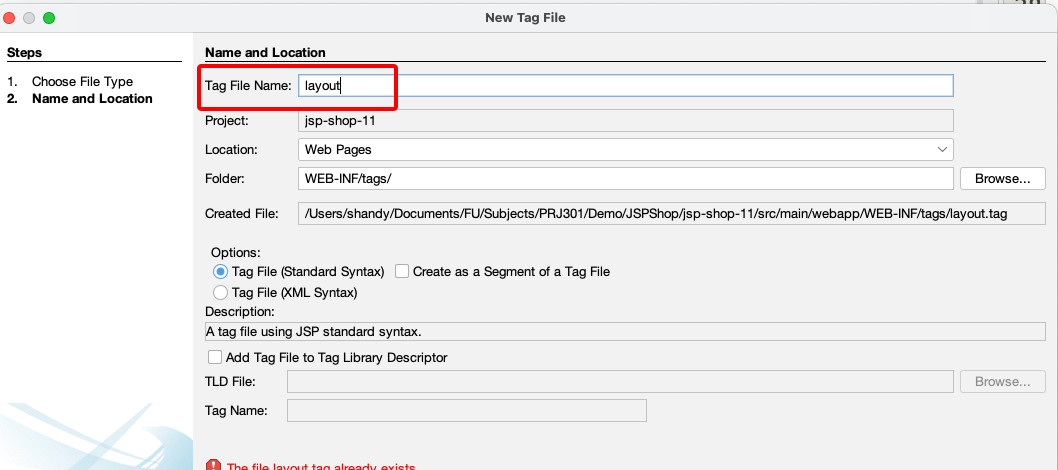
- Tag File Name: “layout”
- Update layout.tag (WEB_INF/Tags/layout.tag):
1
2
3
4
5
6
7
8
9
10
11
12
13
14
15
16
17
18
19
20
21
22
23
24
25
26
27
28
29
30
31
32
33
<%@ tag body-content="scriptless" %>
<%@ attribute name="pageTitle" required="true" %>
<!DOCTYPE html>
<html lang="en">
<head>
    <meta charset="UTF-8">
    <title>${pageTitle}</title>
    <link href="${pageContext.request.contextPath}/assets/css/bootstrap.min.css" rel="stylesheet">
    <link rel="stylesheet" href="${pageContext.request.contextPath}/assets/css/style.css">
</head>
<body>
    <nav class="navbar navbar-expand-lg navbar-dark bg-dark">
        <div class="container">
            <a class="navbar-brand" href="${pageContext.request.contextPath}/product">
                JSP Shop
            </a>
        </div>
    </nav>

    <main class="container py-4">
        <jsp:doBody />
    </main>

    <footer class="bg-light border-top mt-5">
        <div class="container py-3 text-center small text-muted">
            © 2025 Hieu Nguyen - AI lecturer - FPT University Can Tho
        </div>
    </footer>

    <script src="${pageContext.request.contextPath}/assets/js/bootstrap.bundle.min.js"></script>
    <script src="${pageContext.request.contextPath}/assets/js/main.js"></script>
</body>
</html>
2. Update view in JSP file:
Login.jsp:
1
2
3
4
5
6
7
8
9
10
11
12
13
14
15
16
17
18
19
20
<%@ taglib prefix="t" tagdir="/WEB-INF/tags" %>
<%@ page contentType="text/html;charset=UTF-8" %>

<t:layout pageTitle="Login - JSP Shop">
    <h2 class="mb-4">Login Form</h2>
    <form action="${pageContext.request.contextPath}/login" method="post" class="col-md-4">
        <div class="mb-3">
            <label for="username" class="form-label">Username</label>
            <input type="text" id="username" name="username" class="form-control" required>
        </div>

        <div class="mb-3">
            <label for="password" class="form-label">Password</label>
            <input type="password" id="password" name="password" class="form-control" required>
        </div>

        <button type="submit" class="btn btn-primary">Login</button>
        <p style="color:red;">${loginError != null ? loginError : ""}</p>
    </form>
</t:layout>
Home.jsp
1
2
3
4
5
6
7
8
9
10
11
12
13
14
15
16
17
18
19
20
21
22
23
24
25
26
27
28
29
30
31
32
33
34
35
36
37
38
39
40
41
42
43
44
45
46
47
48
49
50
51
52
53
54
55
56
57
58
59
60
61
<%@ taglib uri="http://java.sun.com/jsp/jstl/core" prefix="c" %>
<%@ taglib uri="http://java.sun.com/jsp/jstl/fmt" prefix="fmt" %>
<%@ taglib prefix="t" tagdir="/WEB-INF/tags" %>
<%@ page contentType="text/html;charset=UTF-8" %>

<t:layout pageTitle="Home - JSP Shop">
    <div class="row justify-content-center">
        <div class="col-lg-8">
            <div class="card shadow-sm">
                <div class="card-body">
                    <c:if test="${not empty username}">
                        <h1 class="h3 mb-3">
                        Welcome ${username} to JSP Shop
                            <form class="d-inline m-5" action="${pageContext.request.contextPath}/logout" method="post">
                                <button type="submit" class="btn btn-outline-primary">Logout</button>
                            </form>
                        </h1>
                        <p class="mb-0">
                            This is a simple Home page.
                            for consistent UI with Bootstrap.
                        </p>
                    </c:if>

                    <!-- Show message if user not logged in -->
                    <c:if test="${empty username}">
                        <h1 class="text-danger">You are not logged in.</h2>
                        <a href="${pageContext.request.contextPath}/login" class="btn btn-primary">Login</a>
                    </c:if>
                </div>
            </div>
        </div>
    </div>

    <hr/>
    <h3>Available Products</h3>
    <c:choose>
        <c:when test="${not empty requestScope.products}">
            <table class="table table-bordered">
                <thead>
                    <tr>
                        <th>#</th>
                        <th>Name</th>
                        <th>Price</th>
                    </tr>
                </thead>
                <tbody>
                    <c:forEach var="p" items="${products}" varStatus="status">
                        <tr>
                            <td>${status.index + 1}</td>
                            <td>${p.name}</td>
                            <td><fmt:formatNumber value="${p.price}" type="currency" currencySymbol="VND" /></td>
                        </tr>
                    </c:forEach>
                </tbody>
            </table>
        </c:when>
        <c:otherwise>
            <p class="text-muted">No products available at the moment.</p>
        </c:otherwise>
    </c:choose>
</t:layout>
This post is licensed under CC BY 4.0 by the author.