Session 3: Guide to Using Prompt Engineering Effectively with Java Web
Prompt engineering is essential when integrating AI-driven solutions into Java Web applications. When using large language models (LLMs) like OpenAI’s models, a well-structured prompt can significantly improve the accuracy and relevance of AI-generated responses.
1. Best Practices for Using Prompts in Java Web
1.1. Understand the Use Case
Before writing a prompt, clearly define the objective. Here are different use cases and example prompts:
1.1.1. AI-Generated Content (Automated Responses)
- Use Case: You want AI to generate predefined content dynamically, such as automated email replies or FAQ answers.
- Example Prompt:
1
2
3
You are an AI assistant helping Java Web developers. Generate a clear and concise response to the following FAQ question:
Question: "What is the difference between a Servlet and a JSP?"
Response format: A short technical explanation (50-100 words).
1.1.2. AI for Form Validation or Recommendations
- Use Case: You want AI to check if user input (e.g., a password) follows certain security rules or recommend improvements.
- Example Prompt:
1
2
3
4
5
6
7
8
9
10
Validate the following user password according to these rules:
- At least 8 characters long
- Contains a mix of uppercase, lowercase, numbers, and special characters
- No common dictionary words
Password: "User123"
Return output in JSON format:
{
"isValid": true/false,
"message": "Validation message"
}
1.1.3. AI as a Chatbot for User Queries
- Use Case: You want AI to answer user queries dynamically in a chatbot.
- Example Prompt:
1
2
3
4
5
6
7
8
You are an AI chatbot helping Java Web developers. Answer the following question in a friendly and professional manner:

Question: "How can I connect a Java Servlet to a MySQL database?"

Response format:
- A short introduction
- Code example (if applicable)
- Explanation in simple terms
1.2. Structure Your Prompt Properly
To get accurate and relevant responses, use these techniques:
1.2.1. Be Clear and Concise
- Instead of “Tell me about Servlets” (vague)
- Use “Explain what a Java Servlet is and how it works in a web application” (specific)
Example Prompt:
1
Explain in simple terms what a Java Servlet is and how it processes HTTP requests. Keep the response under 100 words.
1.2.2. Specify the Format of the Expected Output
If you need JSON output for an API response, specify it explicitly.
Example Prompt:
1
2
3
4
5
6
7
8
9
10
11
12
Provide a JSON-formatted response for a user profile in a Java web application. Fields include:
- "username" (string)
- "email" (string)
- "role" (admin/user)
- "lastLogin" (date in YYYY-MM-DD format)
Example JSON output:
{
  "username": "john_doe",
  "email": "john@example.com",
  "role": "admin",
  "lastLogin": "2025-03-12"
}
1.2.3. Provide Examples for Better Understanding
If you expect code output, show an example.
Example Prompt:
1
2
3
4
5
6
Generate a Java Servlet that handles user login. The servlet should:
- Accept username and password via POST request.
- Validate credentials against a hardcoded list.
- Redirect to "dashboard.jsp" if valid, else show an error.
Example:
Servlet: LoginServlet.java
1.2.4. Use Delimiters to Distinguish Instructions from Input
If your prompt includes user input, use delimiters like ### or «< »> to separate instructions.
Example Prompt:
1
2
3
4
5
### INSTRUCTIONS ###
You are an AI assistant for Java web developers. Answer the user's query in a technical and structured manner.
### USER QUERY ###
What is a JavaBean, and how is it used in JSP?
Temperature and max tokens control response style and length.
1.2.5. Lower Temperature (0.2) for Factual, Consistent Responses
Use low temperature when you need reliable and structured responses.
Example Prompt:
1
2
3
4
You are an AI tutor for Java web development. Provide a step-by-step guide on how to configure a JDBC connection in a Servlet.
Use structured, factual information.
Temperature: 0.2 (accurate, consistent)
Max Tokens: 200 (concise response)
1.2.6. Higher Temperature (0.8-1.0) for Creative Outputs
Use high temperature when you need creative or varied responses.
Example Prompt:
1
2
3
Generate a fun and engaging error message for a failed login attempt in a Java Web application. Make it humorous but still professional.
Temperature: 0.9 (more creative, less predictable)
Max Tokens: 50 (short response)
1.2.7. Limit max_tokens to Control Response Length
If you need a short summary, set a low max token value.
Example Prompt:
1
Summarize the advantages of using JSP over Servlets in 50 words or less.
2. Summary
| Feature | Example Prompt |
|---|---|
| AI for Automated Responses | “Explain the difference between a Servlet and a JSP in 100 words.” |
| AI for Validation | “Check if ‘User123’ is a strong password. Return JSON response.” |
| AI Chatbot | “What is the best way to store session data in a Java Web app?” |
| Be Clear & Concise | “Explain Java Servlets in simple terms (100 words).” |
| Specify Output Format | “Generate a JavaBean class with username, email, and password. Return Java code.” |
| Use Examples | “Generate a Servlet for user authentication. Example: LoginServlet.java” |
| Use Delimiters | ”### USER QUERY ### How to use JDBC in a Servlet?” |
| Low Temperature (0.2) | “Provide a structured guide to setting up Tomcat for JSP development.” |
| High Temperature (0.9) | “Create a funny 404 error message for a Java web app.” |
| Limit max_tokens | “Summarize the role of a JavaBean in 50 words.” |
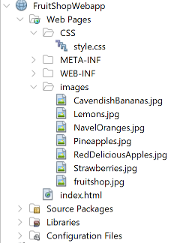
3. Using Prompt for Generative AI (e.g., ChatGPT, Gemini, Copilot): Create Static Website with FruitShopWebApp
1
2
3
4
5
6
7
8
9
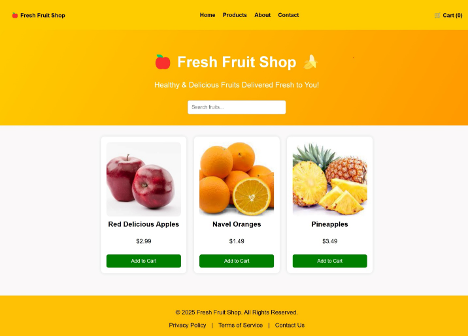
Create a modern, responsive Fruit Shop static website using **HTML5, CSS, and JavaScript**.

Requirements:
- A visually appealing header (jumbotron) with a navbar for easy navigation.
- Display a list of fruit products directly in the HTML with images, names, prices, and an "Add to Cart" button.
- Ensure the images are uniform in height for a clean look.
- Use CSS Flexbox or Grid for layout to maintain responsiveness.
- Add a well-structured footer with copyright information and useful links.
- The design should be user-friendly, mobile-optimized, and accessible.
4. Expected Result: