Object-Oriented Programming
This chapter introduces the Python programming language, focusing on basic data types and operators. It explains how the Python interpreter works, how variables and objects are created, and the difference between mutable and immutable types. Students also learn about common built-in data structures such as lists, tuples, sets, and dictionaries, as well as how to use arithmetic, logical, and comparison operators in Python.
Table of contents
Python’s Sequence Types
In Python, a sequence is a collection of elements stored in a specific order. Each element can be accessed by its index.
Python provides several array-based sequence types, meaning the elements are stored contiguously in memory, like an array.
The most important ones are:
| Type | Mutable? | Example |
|---|---|---|
list | Yes | [1, 2, 3] |
tuple | No | (1, 2, 3) |
str | No | "AI" |
bytes | No | b'AI' |
bytearray | Yes | bytearray(b'AI') |

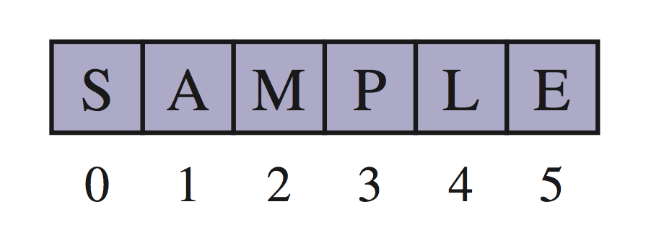
An array can store primitive elements, such as characters, giving us a compact array.
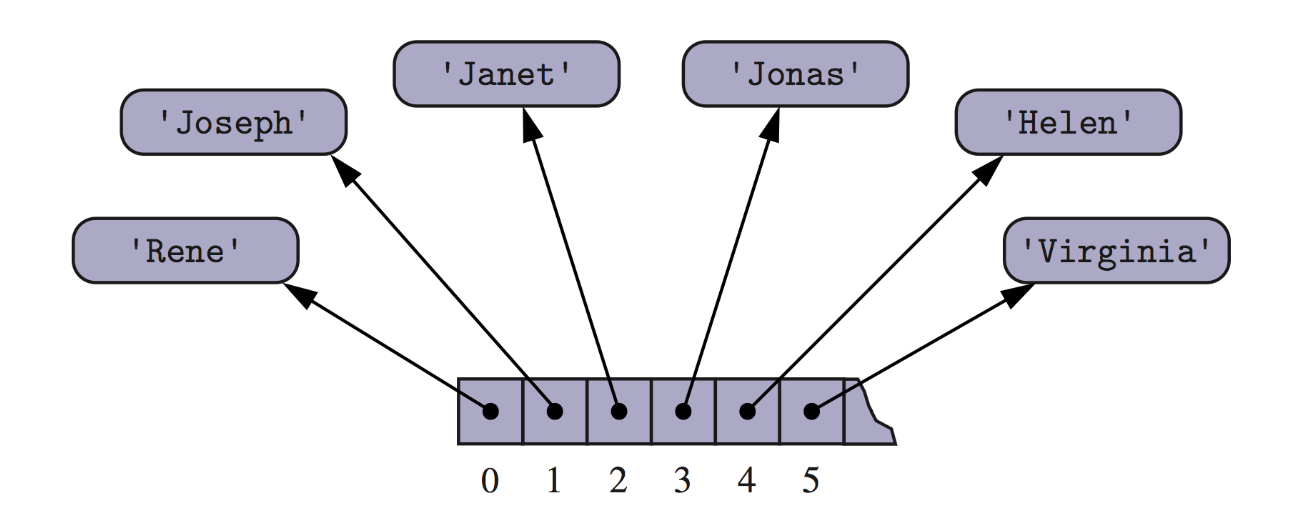
An array can also store references to objects.
Compact Arrays
1. What is a Compact Array?
A compact array stores elements in raw binary form, just like arrays in C.
Primary support for compact arrays is in a module named array. That module defines a class, also named array, providing compact storage for arrays of primitive data types.
This makes them:
- Much smaller in memory
- Faster for numerical data
- Restricted to one data type
Python implements this using:
1
from array import array
2. Creating an Array
The constructor for the array class requires a type code as a first parameter, which is a character that designates the type of data that will be stored in the array.
To create an array, you must specify:
- A type code
- An initial sequence of values
1
primes = array('i', [2, 3, 5, 7, 11, 13, 17, 19])
- ‘i’ = integer
- [10, 20, 30, 40] = initial data
Accessing Elements:
1
2
3

print(primes[0])     # 2
print(primes[1:3])   # array('i', [3, 5, 7])
You can also modify them:
1
2
primes[0] = 99
primes.append(50)
3. Type Codes
The type code tells Python what kind of data the array will store.
| Code | C Data Type | Typical Number of Bytes |
|---|---|---|
| ‘b’ | signed char | 1 |
| ‘B’ | unsigned char | 1 |
| ‘u’ | Unicode char | 2 or 4 |
| ‘h’ | signed short int | 2 |
| ‘H’ | unsigned short int | 2 |
| ‘i’ | signed int | 2 or 4 |
| ‘I’ | unsigned int | 2 or 4 |
| ‘l’ | signed long int | 4 |
| ‘L’ | unsigned long int | 4 |
| ‘f’ | float | 4 |
| ‘d’ | double (float) | 8 |
1
2
array('f', [1.2, 3.4, 5.6])
array('i', [1, 2, 3, 4])
4.Compact Arrays vs Lists
| Feature | List | array |
|---|---|---|
| Can mix types | Yes | No |
| Memory usage | High | Low |
| Speed for numbers | Slower | Faster |
| Numeric processing | OK | Better |
| Used in AI/data | Sometimes | Very common |
When to Use array Instead of list
- Use array when:
- All values have the same type
- You need high performance
- Memory usage matters
Use list when:
- Data types are mixed
- You need flexibility
Insertion in an Array
Consider an array with n elements:
1
A = [A0, A1, A2, ..., A(n−1)]
We perform an operation:
1
add(i, o)
- In an add(o) operation (without an index), we could always add at the end
- When the array is full, we replace the array with a larger one
- How large should the new array be?
- Incremental strategy: increase the size by a constant c
- Doubling strategy: double the size
1
2
3
4
5
6
7
Algorithm add(o)
	if t = S.length - 1 then A <- new array of size …
		for i = 0 to n-1 do
			 A[i] <- S[i]
		S <- A
	n <- n + 1
	S[n-1] <- o
Which means insert object o at index i.
What Happens During Insertion?
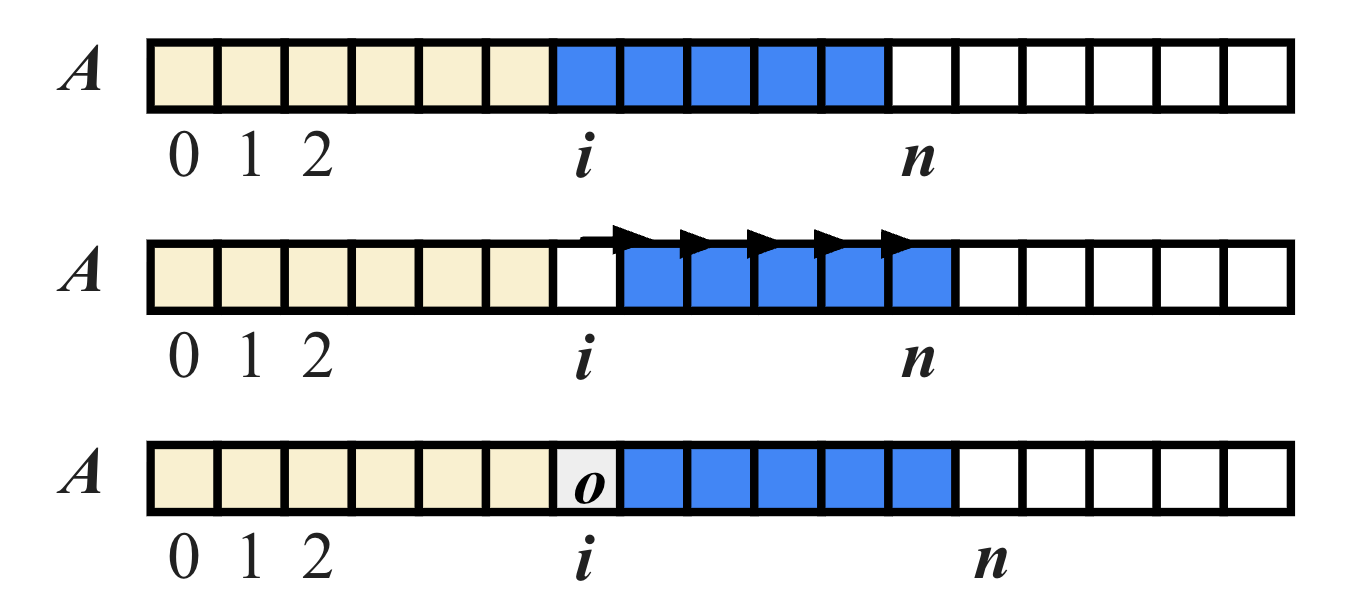
To insert at position i, we must:
- Step 1: Make space for the new element
- Step 2: Shift all elements from index i to n−1 one position to the right
Notes:
- list.append() is fast
- list.insert(0, x) is slow
Why append() is fast
When you do:
1
lst.append(x)
Python:
- Checks if there is free space at the end
- If yes => stores x in the next empty slot
- No elements need to move
So this is:
- O(1) (constant time, on average)
Example:
1
2
[10, 20, 30, _]  => append(40)
[10, 20, 30, 40]
Even when Python runs out of space, it:
- Allocates a larger block
- Copies everything once
- This happens rarely, so amortized time is still O(1).
Why insert(0, x) is slow
Now consider:
1
lst.insert(0, x)
You are inserting at the front.
Memory before:
1
[10, 20, 30, 40]
To put x at index 0, Python must:
- Move 40 to index 4
- Move 30 to index 3
- Move 20 to index 2
- Move 10 to index 1
- Put x at index 0
Result:
1
[x, 10, 20, 30, 40]
Every element must be shifted one position to the right.
That is:
1
n moves for n elements => O(n)
| Operation | What happens | Time |
|---|---|---|
append(x) | Put x in next free slot | O(1) |
insert(0, x) | Shift all elements right | O(n) |
Element Removal in an Array
Assume we have an array with n elements:
- A = [A0, A1, A2, …, A(n−1)]
We perform:
1
remove(i)
which means delete the element at index i.
What Happens Internally?
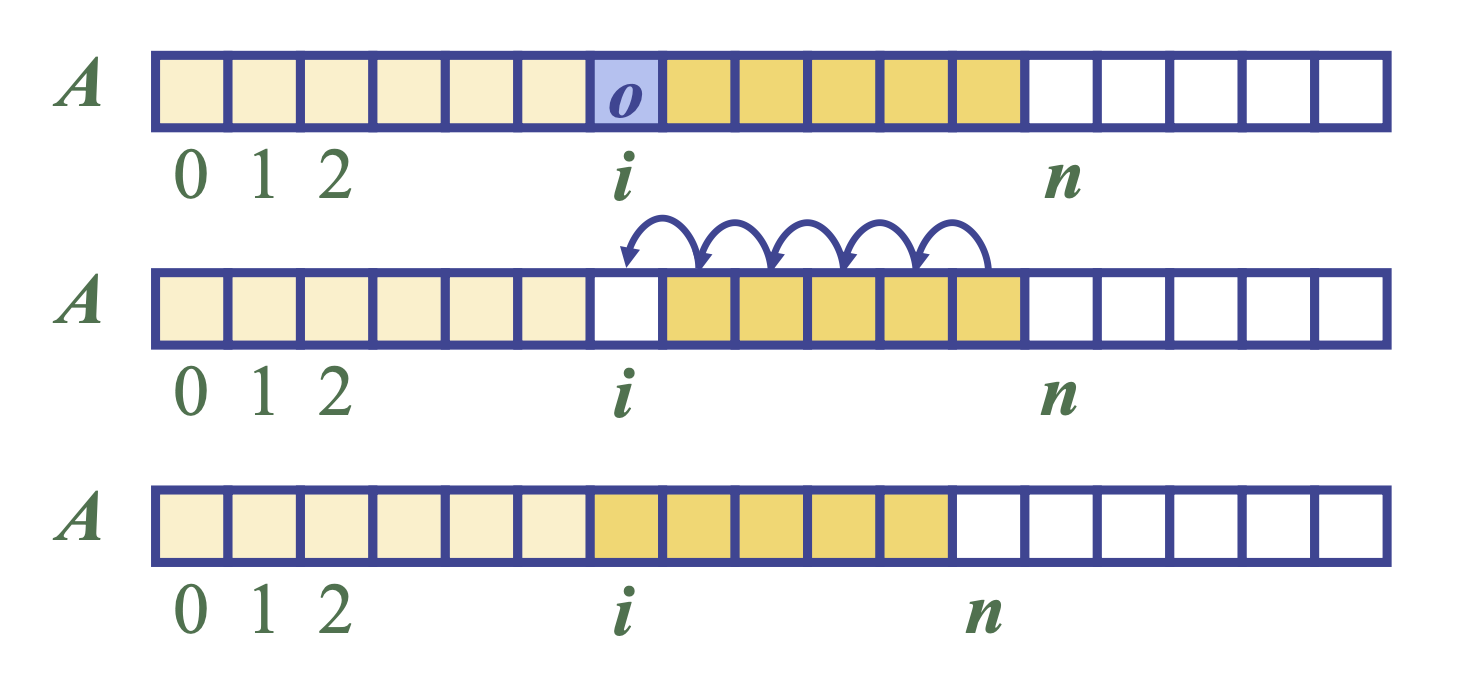
When we remove A[i], we create a hole in the array:
1
2
3
1. Before: [A0, A1, A2, ..., A(n-1)]
2. remove(1) => remove A1
3. After hole: [A0,  _ , A2, A3, ..., A(n-1)]
To keep elements contiguous, we must shift everything after index i one position to the left:
1
A[i+1], A[i+2], ..., A[n−1]
Move to:
1
A[i], A[i+1], ..., A[n−2]
Final result:
1
[A0, A2, A3, ..., A(n-2)]
Performance of an Array-Based Dynamic List
In an array based implementation of a dynamic list:
- The space used by the data structure is O(n)
- Indexing the element at I takes O(1) time
- Space Complexity
If the list stores n elements, it uses:
1
O(n) # space
Even though Python may allocate a little extra unused space, the memory grows linearly with the number of elements.
- Indexing Time
Accessing an element:
1
A[i]  # Big-O: O(1)
This gives it very specific performance characteristics. Why?
Because the array stores elements in contiguous memory, so the address of A[i] is computed directly:
address = base + i × element_size
- Insertion and Removal
| Operation | Worst Case Time | Reason |
|---|---|---|
add(i, x) | O(n) | Elements must be shifted right |
remove(i) | O(n) | Elements must be shifted left |
Full code python
| Operation | Time Complexity | Reason |
|---|---|---|
append(x) | O(1) amortized | resize |
insert(i, x) | O(n) | shift n − i elements |
remove(i) | O(n) | shift n − i − 1 elements |
A[i] | O(1) | direct indexing |
1
2
3
4
5
6
7
8
9
10
11
12
13
14
15
16
17
18
19
20
21
22
23
24
25
26
27
28
29
30
31
32
33
34
35
36
37
38
39
40
41
42
43
44
45
46
47
48
49
50
51
52
53
54
55
56
57
58
59
60
61
62
63
64
65
66
67
import ctypes    # provides low-level arrays

class DynamicArray:
    """A dynamic array class akin to a simplified Python list."""

    def __init__(self):
        """Create an empty array."""
        self._n = 0                         # count actual elements
        self._capacity = 1                  # default array capacity
        self._A = self._make_array(self._capacity)

    def __len__(self):
        """Return number of elements stored in the array."""
        return self._n

    def __getitem__(self, k):
        """Return element at index k."""
        if not 0 <= k < self._n:
            raise IndexError('invalid index')
        return self._A[k]

    def append(self, obj):
        """Add object to end of the array."""
        if self._n == self._capacity:
            self._resize(2 * self._capacity)
        self._A[self._n] = obj
        self._n += 1

    def insert(self, i, x):
        """Insert element x at index i."""
        if not 0 <= i <= self._n:
            raise IndexError('invalid index')

        # resize if array is full
        if self._n == self._capacity:
            self._resize(2 * self._capacity)

        # shift elements to the right
        for k in range(self._n, i, -1):
            self._A[k] = self._A[k - 1]

        self._A[i] = x
        self._n += 1

    def remove(self, i):
        """Remove element at index i."""
        if not 0 <= i < self._n:
            raise IndexError('invalid index')

        # shift elements to the left
        for k in range(i, self._n - 1):
            self._A[k] = self._A[k + 1]

        self._A[self._n - 1] = None  # avoid loitering
        self._n -= 1

    def _resize(self, c):
        """Resize internal array to capacity c."""
        B = self._make_array(c)
        for k in range(self._n):
            B[k] = self._A[k]
        self._A = B
        self._capacity = c

    def _make_array(self, c):
        """Return new array with capacity c."""
        return (c * ctypes.py_object)()
Exercises
1. User Activity Log Management
An AI-enabled system needs to store user activity logs in chronological order.
Each log entry is represented as a tuple:
1
(user_id, action)
Example:
1
2
3
("u01", "login")
("u01", "view_page")
("u01", "logout")
- Task 1 – Add a Log Entry
This task simulates recording a new user action in the system.
New log entries should always be added to the end of the log list, preserving chronological order.
Create a function as below:
1
def add_log(logs, user_id, action):
Input:
- logs: a DynamicArray object storing log entries
- user_id: string representing the user identifier
- action: string representing the user action
Output:
- No return value
- A new log (user_id, action) is appended to logs
Requirement
- Use the append() method of DynamicArray
1
2
3
4
5
6
7
8
9
10
11
12
13
def add_log(logs, user_id, action):
    """
    Task 1: Add a log entry to the end of the DynamicArray.

    Input:
        logs    : DynamicArray
        user_id : str
        action  : str

    Output:
        None
    """
    logs.append((user_id, action))
- Task 2 – Insert a Priority Log
Some system events (e.g., security checks) must be logged before all other events.
This task inserts a high-priority log at the beginning of the log list.
Create a function as below:
1
def insert_priority_log(logs, user_id, action):
Input:
- logs: a DynamicArray object
- user_id: string
- action: string
Output:
- No return value
- A new log is inserted at index 0
Requirement
- Use insert(0, x)
1
2
3
4
5
6
7
8
9
10
11
12
13
def insert_priority_log(logs, user_id, action):
    """
    Task 2: Insert a high-priority log at the beginning of the DynamicArray.

    Input:
        logs    : DynamicArray
        user_id : str
        action  : str

    Output:
        None
    """
    logs.insert(0, (user_id, action))
- Task 3 – Remove an Invalid Log
Sometimes a log entry is incorrect or corrupted and must be removed.
This task deletes a log entry at a specified position while maintaining the order of remaining logs.
Create a function as below:
1
def remove_log(logs, index):
Input:
- logs: a DynamicArray object
- index: integer index of the log to remove
Output:
- No return valueT
- The log at position index is removed
Requirement
- Use remove(index)
1
2
3
4
5
6
7
8
9
10
11
12
def remove_log(logs, index):
    """
    Task 3: Remove the log entry at the given index.

    Input:
        logs  : DynamicArray
        index : int

    Output:
        None
    """
    logs.remove(index)
- Task 4 – Remove an Invalid Log
The system must be able to quickly retrieve a specific log entry for auditing or debugging purposes.
Create a function as below:
1
def get_log(logs, index):
Input:
- logs: a DynamicArray object
- index: integer
Output:
- Returns the log entry at position index
- Type: tuple (user_id, action)
Requirement
- Use array indexing (logs[index])
1
2
3
4
5
6
7
8
9
10
11
12
def get_log(logs, index):
    """
    Task 4: Retrieve the log entry at the given index.

    Input:
        logs  : DynamicArray
        index : int

    Output:
        tuple (user_id, action)
    """
    return logs[index]
- Using:
1
2
3
4
5
6
7
8
9
10
11
12
13
14
15
16
17
18

from dynamicArray import DynamicArray

# ... task 1
# ... task 2
# ... task 3
# ... task 4

logs = DynamicArray()

add_log(logs, "u01", "login")
add_log(logs, "u01", "view_page")
insert_priority_log(logs, "admin", "system_check")

print(get_log(logs, 0))
# ('admin', 'system_check')

remove_log(logs, 1)
Queue
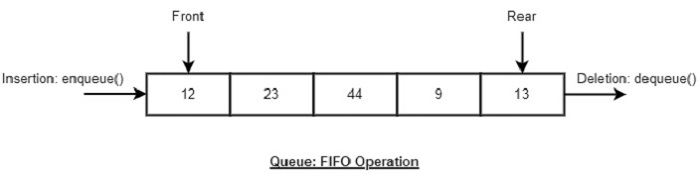
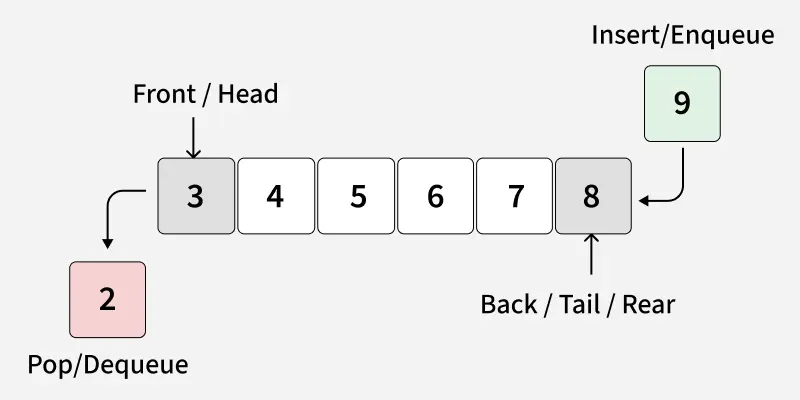
A Queue ADT stores arbitrary objects and follows the First-In, First-Out (FIFO) principle.
The first element inserted into the queue is the first one removed.
Queue Discipline (FIFO)
- Insertion happens at the rear of the queue
- Removal happens at the front of the queue
Main queue operations:
- enqueue(object): inserts an element at the end of the queue
- object dequeue(): removes and returns the element at the front of the queue
Auxiliary queue operations:
- object first(): returns the element at the front without removing it
- integer len(): returns the number of elements stored
- boolean is_empty(): indicates whether no elements are stored
Exceptions: Attempting the execution of dequeue or front on an empty queue throws an EmptyQueueException
Time Complexity (Array-Based Queue)
| Operation | Time |
|---|---|
enqueue | O(1) |
dequeue | O(n) |
first | O(1) |
is_empty | O(1) |
Array-Based Queue Implementation
A queue can be efficiently implemented using an array of fixed size N in a circular fashion.
Instead of shifting elements, the array is treated as circular, wrapping around when the end is reached.

Two integer variables are used to track the queue:
- f: index of the front element
- r: index immediately past the rear element
Important rule
- Array location r is always kept empty
- This helps distinguish between full and empty states
1
2
Array indices: 0  1  2  3  4  ...  N-1
Queue wraps around using modulo arithmetic
Size Operation

1
2
Algorithm size()
	return (N - f + r) mod N
Explanation:
- Computes the number of elements stored
- Works correctly even when indices wrap around
isEmpty Operation
1
2
Algorithm isEmpty()
    return (f = r)
Explanation:
- When f == r, the queue contains no elements
Enqueue Operation (Full Queue Case)
The enqueue operation inserts an element at position r
After insertion: r <- (r + 1) mod N
1
2
3
4
5
6
Algorithm enqueue(o)
	if size() = N <- 1 then
		throw FullQueueException
	 else
		Q[r] <- o
		r <- (r + 1) mod N
In this case:
- enqueue throws an exception
- The specific exception type is implementation-dependent
Queue ADT function:
| Operation | Return Value | Queue (first <- Q <- last) |
|---|---|---|
| Q.enqueue(5) | – | [5] |
| Q.enqueue(3) | – | [5, 3] |
| len(Q) | 2 | [5, 3] |
| Q.dequeue() | 5 | [3] |
| Q.is_empty() | False | [3] |
| Q.dequeue() | 3 | [] |
| Q.is_empty() | True | [] |
| Q.dequeue() | “error” | [] |
| Q.enqueue(7) | – | [7] |
| Q.enqueue(9) | – | [7, 9] |
| Q.first() | 7 | [7, 9] |
| Q.enqueue(4) | – | [7, 9, 4] |
| len(Q) | 3 | [7, 9, 4] |
| Q.dequeue() | 7 | [9, 4] |
Direct applications
- Waiting lists, bureaucracy
- Access to shared resources (e.g., printer)
- Multiprogramming
Indirect applications
- Auxiliary data structure for algorithms
- Component of other data structures
Array-based Queue
- Use an array of size N in a circular fashion
- Two variables keep track of the front and rear
- f index of the front element
- r index immediately past the rear element Array location r is kept empty
Queue Operations
- We use the modulo operator (remainder of division)
1
2
3
4
5
Algorithm size()
	return (N - f + r) mod N

Algorithm isEmpty()
	return (f = r)
- Operation enqueue throws an exception if the array is full
- This exception is implementation-dependent
1
2
Operation enqueue throws an exception if the array is full
This exception is implementation-dependent
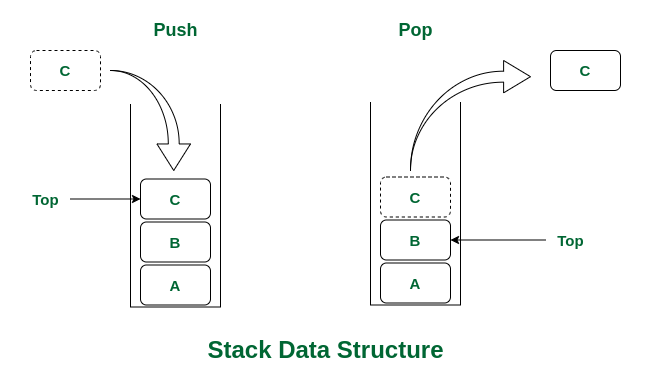
Stack
Abstract Data Type (ADT)
An Abstract Data Type (ADT) is an abstraction of a data structure. It defines what operations are supported and how the data behaves, without specifying how the data is implemented.
An ADT specifies:
- Data stored
- Operations on the data
- Error conditions associated with operations
Example: ADT for a Stock Trading System
Data Stored: Buy and sell orders
Supported Operations
1
2
3
order buy(stock, shares, price)
order sell(stock, shares, price)
void cancel(order)
Error Conditions
- Buying or selling a nonexistent stock
- Canceling a nonexistent order
Basic Terminologies of Queue
Front: Position of the entry in a queue ready to be served, that is, the first entry that will be removed from the queue, is called the front of the queue. It is also referred as the head of the queue.
Rear: Position of the last entry in the queue, that is, the one most recently added, is called the rear of the queue. It is also referred as the tail of the queue.
Size: Size refers to the current number of elements in the queue.
Capacity: Capacity refers to the maximum number of elements the queue can hold.