Binary Search Tree
Practice for Binary Search Tree
Rule examination:
Students are ONLY allowed to use:
- Software tools must be used: pycharm or visual studio code and python 3.x.
- His/her own study materials like presentation slides, notes, sample codes, program examples, electronic books stored on his/her computer only.
Instructions
- Step 1: Naming the main file with Qx.py, for example: Q1.py, Q2.py, Q3.py…
- Step 2:
- Prepare to submit answer:
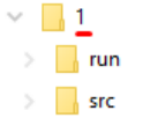
- For each question (e.g., question 1), please create two sub-folders: run and src.
- Copy *.py file into run folder.
- Rename Qx.py to Qx.exe.
- Copy *.py file into src folder.
- Step 3: Submit solution for each question:
- Choose question number (e.g., 1) in PEA software, and then attach the corresponding solution folder (e.g., 1).
- Click the Submit button to finish submitting this question.
Assignment 1: Parity-Based Preorder Traversal in Binary Search Tree (BST)
Problem Description
You are given a sequence of distinct integers. Your task is to construct a Binary Search Tree (BST) using the standard insertion rule:
- If the inserted value is less than the current node -> go to the left subtree
- If the inserted value is greater than the current node -> go to the right subtree
After constructing the BST, instead of performing a standard preorder traversal (Root -> Left -> Right), you must implement a Parity-Based Preorder Traversal defined as follows:
Parity-Based Preorder Traversal Rule
At each node during traversal:
- If the node’s value is even, visit in this order:
1
Root -> Right -> Left
- If the node’s value is odd, visit in this order:
1
Root -> Left -> Right
This means that the traversal order dynamically changes depending on whether the current node contains an even or odd value.
Input Format
The first line contains an integer n — the number of elements in the BST.
The second line contains n distinct integers.
Print the result of the Parity-Based Preorder Traversal of the constructed BST.
Examples
Input
1
2
7
50 30 70 20 40 60 80
Output
1
50 70 80 60 30 40 20
Implementing in templates exam:
1
2
3
4
5
6
7
8
9
10
11
12
13
14
15
16
17
18
19
20
21
22
23
24
25
26
27
28
29
30
31
32
33
34
35
36
37
38
39
40
41
42
43
44
45
46
47
48
49
50
51
52
53
54
55
56
57
58
59
60
61
62
63
64
65
66
67
68
69
# --FIXED PART - DO NOT EDIT ANY THINGS HERE--
# --START FIXED PART--------------------------
import sys
# --END FIXED PART--------------------------

# --SYSTEM MODULES - @STUDENT: IMPORT SYSTEM MODULES HERE:


# --YOUR-OWN MODULES - @STUDENT: IMPORT YOUR-OWN MODULES HERE:
# from <fileName> import <className>
# For example, the file Node.py contains a class named Node,
# The statement to import class Node is: from Node import Node


# --Change the name of input and output file based on practical paper
input_file = "input.txt"
output_file = "output.txt"

# --VARIABLES - @STUDENT: DECLARE YOUR GLOBAL VARIABLES HERE:


# --ALGORITHM - @STUDENT: ADD YOUR-OWN CLASS OR METHODS HERE (IF YOU NEED):


# --FIXED PART - DO NOT EDIT ANY THINGS HERE--
# --This part is used for Automated Marking Software
# --START FIXED PART--------------------------
def set_file():
    global input_file, output_file
    length = len(sys.argv)
    input_file = input_file if length < 2 else sys.argv[1]
    output_file = output_file if length < 2 else sys.argv[2]


all_lines_of_input = ""
result_for_output = ""


def read_file():
    global input_file, all_lines_of_input  # import more global variables your own (if you need)
    with open(input_file, 'r') as file:
        all_lines_of_input = file.readlines()


# --START FIXED PART--------------------------
def solve():
    global all_lines_of_input, result_for_output  # import more global variables your own (if you need)
    result_for_output = ""
    # --END FIXED PART--------------------------
    # ALGORITHM - @STUDENT: ADD YOUR CODE HERE:


# --START FIXED PART--------------------------
def print_result():
    global output_file, result_for_output  # import more global variables your own (if you need)
    with open(output_file, 'w') as file:
        # --END FIXED PART--------------------------
        # ALGORITHM - @STUDENT: ADD YOUR CODE HERE:
        file.write(result_for_output)


# --START FIXED PART--------------------------
if __name__ == "__main__":
    set_file()
    read_file()
    solve()
    print_result()
    # --END FIXED PART--------------------------
- STEP 1 — Declare Node Class
Add this inside:
1
2
3
4
5
6
# --ALGORITHM
class Node:
    def __init__(self, value):
        self.value = value
        self.left = None
        self.right = None
- STEP 2 — BST Insert Function (Standard)
1
2
3
4
5
6
7
8
9
10
def insert(root, value):
    if root is None:
        return Node(value)

    if value < root.value:
        root.left = insert(root.left, value)
    else:
        root.right = insert(root.right, value)

    return root
- STEP 3 — Parity-Based Preorder Traversal
1
2
3
4
5
6
7
8
9
10
11
12
def parityPreorder(root, result):
    if root is None:
        return

    result.append(str(root.value))

    if root.value % 2 == 0:
        parityPreorder(root.right, result)
        parityPreorder(root.left, result)
    else:
        parityPreorder(root.left, result)
        parityPreorder(root.right, result)
- STEP 4 — Implement solve()
Replace:
1
# ALGORITHM - @STUDENT: ADD YOUR CODE HERE:
with:
1
2
3
4
5
6
7
8
9
10
11
12
13
14
lines = all_lines_of_input

n = int(lines[0].strip())
values = list(map(int, lines[1].split()))

root = None

for v in values:
    root = insert(root, v)

result = []
parityPreorder(root, result)

result_for_output = " ".join(result)
- STEP 5 - Create a file text case - input.txt
1
2
7
50 30 70 20 40 60 80
Assignment 2: Enhanced Binary Search Tree for Numeric Dataset with Duplicate Management
Implement an Enhanced Binary Search Tree (BST) that is capable of:
- Storing numeric values (integer or floating-point)
- Handling duplicate values
- Supporting dynamic insertion and deletion
- Maintaining frequency count for duplicates
- Performing advanced queries on the dataset
In real-world systems such as:
- Online transaction processing
- Sensor data monitoring
- Log analysis
- Inventory quantity tracking
Duplicate numeric values frequently occur.
A traditional BST typically does not handle duplicates efficiently.
In this assignment, instead of inserting duplicate values as separate nodes, you must:
Store only one node per unique value Maintain an additional field called: count
Input Specification
The input consists of:
- A list of numeric values used to construct the BST
- A list of values to delete
- A value to search
- A range [L, R] for range query
Example Input:
Format
1
<command> <value>
1
2
3
4
Insert 50 30 70 30 90 70 20 30 60 80 70
Delete 30 70 100
Search 60
Range 30 80
Output Specification
- In-order Traversal (with count)
1
value(count)
1
20(1) 30(3) 50(1) 60(1) 70(3) 80(1) 90(1)
- After Deletion Operation
Deletion Rules:
- If count > 1 -> Decrease count only
- If count == 1 -> Remove the node from BST
- If value not found -> print: “Value x not found”
- Search Result
Example:
1
Found: 60(1)
or
1
Not Found
- Range Query Result [L, R]
Return all nodes such that:
1
L ≤ value ≤ R
Format:
1
value(count)
Example:
1
30(2) 50(1) 60(1) 70(2) 80(1)
Test case
1
2
3
4
Insert 50 30 70 30 90 70 20 30 60 80 70
Delete 30 70 100
Search 60
Range 30 80
1
2
3
4
5
6
7
8
9
10
11
In-order 20(1) 30(3) 50(1) 60(1) 70(3) 80(1) 90(1)

---Deletion---
Value 100 not found
20(1) 30(2) 50(1) 60(1) 70(2) 80(1) 90(1)

---Search---
Found: 60(1)

---Range---
From 30 to 80: 30(2) 50(1) 60(1) 70(2) 80(1)
Assignment 3: Binary Search Tree with Structural Duplicate Handling
Implement a Binary Search Tree (BST) that stores numeric values and supports multiple queries.
Unlike standard implementations, this BST must handle duplicates using a structural rule, not frequency counting.
You are required to build a BST from a given list of numbers and process a sequence of queries.
- Duplicate Handling Rule
- When inserting a value x:
- If x < node.value: insert into LEFT subtree
- If x ≥ node.value: insert into RIGHT subtree
This means:
- Duplicate values are allowed
- Each duplicate is stored as a separate node
- Duplicates will form a right-skewed chain
Input Specification
The input consists of:
1
2
3
4
5
6
7
n
v1 v2 v3 ... vn
q
query_1
query_2
...
query_q
Where:
- n — number of values (1 ≤ n ≤ 10⁵)
- Values are separated by space
- q — number of queries
Each query is one of the supported operations below
Example Input
1
2
3
4
5
6
7
8
9
10 12 5 4 20 8 7 15 13
5
DEPTH 13
WIDTH
LONGEST_PATH
DELETE 12
PRINT_LEVEL
Output Specification
1. DEPTH x
- Return the depth (level) of node x.
- Root has depth = 0
- If multiple nodes have value x, return the depth of the first encountered node during search
Example
1
DEPTH 13
Output
1
4
If not found:
1
Not Found
2. WIDTH
Return the maximum number of nodes at any level of the tree.
3. LONGEST_PATH
Return the longest path from root to a leaf.
Format
1
v1 -> v2 -> v3 -> ... -> vk
If multiple paths have the same length, return any one.
4. DELETE x
Delete the first occurrence of value x encountered during BST search.
Rules:
- Standard BST deletion applies:
- Leaf node -> remove directly
- One child -> replace with child
- Two children -> replace with inorder successor
If value not found:
1
Value not found
After deletion, print in-order traversal:
1
v1 v2 v3 ... vk
5. PRINT_LEVEL
Print the tree level by level (Breadth-First Traversal)
Format
Each level on one line:
1
2
3
4
level_0
level_1
level_2
...
Test case
Example Input
1
2
3
4
5
6
7
8
9
10 12 5 4 20 8 7 15 13
5
DEPTH 13
WIDTH
LONGEST_PATH
DELETE 12
PRINT_LEVEL
Example Output
1
2
3
4
5
6
7
8
4
3
10 -> 12 -> 20 -> 15 -> 13
4 5 7 8 10 13 15 20
10
5 20
4 8 15
7 13