Before writing a prompt, clearly define the objective. Here are different use cases and example prompts:
1
2
3
You are an AI assistant helping Java Web developers. Generate a clear and concise response to the following FAQ question:
Question: "What is the difference between a Servlet and a JSP?"
Response format: A short technical explanation (50-100 words).
1
2
3
4
5
6
7
8
9
10
Validate the following user password according to these rules:
- At least 8 characters long
- Contains a mix of uppercase, lowercase, numbers, and special characters
- No common dictionary words
Password: "User123"
Return output in JSON format:
{
"isValid": true/false,
"message": "Validation message"
}
1
2
3
4
5
6
7
8
You are an AI chatbot helping Java Web developers. Answer the following question in a friendly and professional manner:

Question: "How can I connect a Java Servlet to a MySQL database?"

Response format:
- A short introduction
- Code example (if applicable)
- Explanation in simple terms
To get accurate and relevant responses, use these techniques:
Example Prompt:
1
Explain in simple terms what a Java Servlet is and how it processes HTTP requests. Keep the response under 100 words.
If you need JSON output for an API response, specify it explicitly.
Example Prompt:
1
2
3
4
5
6
7
8
9
10
11
12
Provide a JSON-formatted response for a user profile in a Java web application. Fields include:
- "username" (string)
- "email" (string)
- "role" (admin/user)
- "lastLogin" (date in YYYY-MM-DD format)
Example JSON output:
{
  "username": "john_doe",
  "email": "john@example.com",
  "role": "admin",
  "lastLogin": "2025-03-12"
}
If you expect code output, show an example.
Example Prompt:
1
2
3
4
5
6
Generate a Java Servlet that handles user login. The servlet should:
- Accept username and password via POST request.
- Validate credentials against a hardcoded list.
- Redirect to "dashboard.jsp" if valid, else show an error.
Example:
Servlet: LoginServlet.java
If your prompt includes user input, use delimiters like ### or «< »> to separate instructions.
Example Prompt:
1
2
3
4
5
### INSTRUCTIONS ###
You are an AI assistant for Java web developers. Answer the user's query in a technical and structured manner.
### USER QUERY ###
What is a JavaBean, and how is it used in JSP?
Temperature and max tokens control response style and length.
Use low temperature when you need reliable and structured responses.
Example Prompt:
1
2
3
4
You are an AI tutor for Java web development. Provide a step-by-step guide on how to configure a JDBC connection in a Servlet.
Use structured, factual information.
Temperature: 0.2 (accurate, consistent)
Max Tokens: 200 (concise response)
Use high temperature when you need creative or varied responses.
Example Prompt:
1
2
3
Generate a fun and engaging error message for a failed login attempt in a Java Web application. Make it humorous but still professional.
Temperature: 0.9 (more creative, less predictable)
Max Tokens: 50 (short response)
If you need a short summary, set a low max token value.
Example Prompt:
1
Summarize the advantages of using JSP over Servlets in 50 words or less.
| Feature | Example Prompt |
|---|---|
| AI for Automated Responses | “Explain the difference between a Servlet and a JSP in 100 words.” |
| AI for Validation | “Check if ‘User123’ is a strong password. Return JSON response.” |
| AI Chatbot | “What is the best way to store session data in a Java Web app?” |
| Be Clear & Concise | “Explain Java Servlets in simple terms (100 words).” |
| Specify Output Format | “Generate a JavaBean class with username, email, and password. Return Java code.” |
| Use Examples | “Generate a Servlet for user authentication. Example: LoginServlet.java” |
| Use Delimiters | ”### USER QUERY ### How to use JDBC in a Servlet?” |
| Low Temperature (0.2) | “Provide a structured guide to setting up Tomcat for JSP development.” |
| High Temperature (0.9) | “Create a funny 404 error message for a Java web app.” |
| Limit max_tokens | “Summarize the role of a JavaBean in 50 words.” |
1
2
3
4
5
6
7
8
9
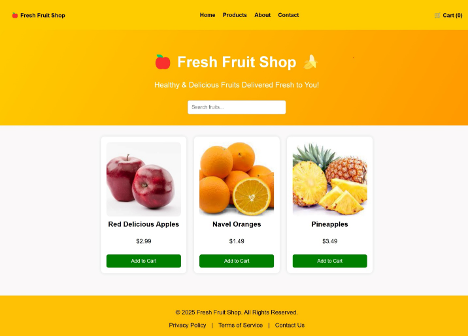
Create a modern, responsive Fruit Shop static website using **HTML5, CSS, and JavaScript**.

Requirements:
- A visually appealing header (jumbotron) with a navbar for easy navigation.
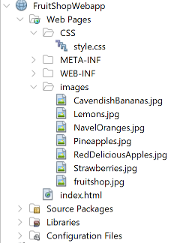
- Display a list of fruit products directly in the HTML with images, names, prices, and an "Add to Cart" button.
- Ensure the images are uniform in height for a clean look.
- Use CSS Flexbox or Grid for layout to maintain responsiveness.
- Add a well-structured footer with copyright information and useful links.
- The design should be user-friendly, mobile-optimized, and accessible.