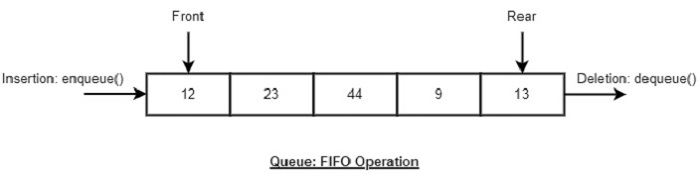
A Queue ADT stores arbitrary objects and follows the First-In, First-Out (FIFO) principle.
The first element inserted into the queue is the first one removed.
Queue Discipline (FIFO)
| Term | Meaning |
|---|---|
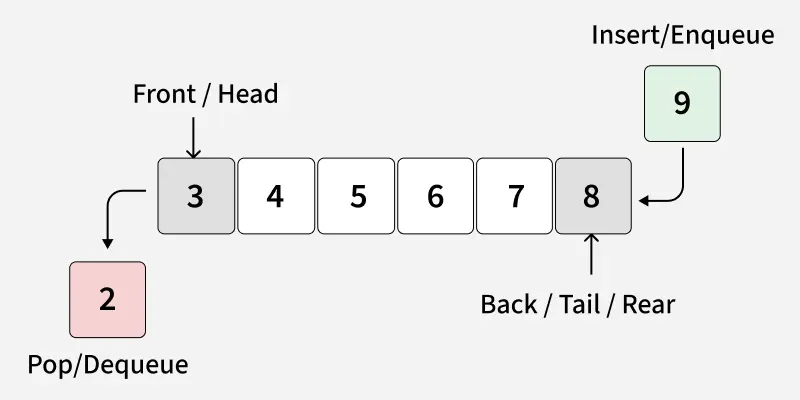
| Front | Position where elements are removed |
| Rear (Back) | Position where elements are added |
| Operation | Description |
|---|---|
enqueue(x) |
Insert element x at the rear |
dequeue() |
Remove and return the front element |
peek() / front() |
Return the front element without removing it |
is_empty() |
Check whether the queue is empty |
size() |
Return the number of elements |
Exceptions: Attempting the execution of dequeue or front on an empty queue throws an EmptyQueueException
items: a container to store queue elements
A queue can be efficiently implemented using an array of fixed size N in a circular fashion.
Instead of shifting elements, the array is treated as circular, wrapping around when the end is reached.

Two integer variables are used to track the queue:
Important rule
- Array location r is always kept empty
- This helps distinguish between full and empty states
1
2
Array indices: 0  1  2  3  4  ...  N-1
Queue wraps around using modulo arithmetic

1
2
Algorithm size()
	return (N - f + r) mod N
Explanation:
1
2
Algorithm isEmpty()
    return (f = r)
Explanation:
The enqueue operation inserts an element at position r
After insertion: r <- (r + 1) mod N
1
2
3
4
5
6
Algorithm enqueue(o)
	if size() = N <- 1 then
		throw FullQueueException
	 else
		Q[r] <- o
		r <- (r + 1) mod N
In this case:
1
2
3
4
5
6
7
8
9
10
11
12
13
14
15
16
17
18
19
20
21
22
class Queue:
    def __init__(self):
        self.items = []

    def is_empty(self):
        return len(self.items) == 0

    def enqueue(self, item):
        self.items.append(item)

    def dequeue(self):
        if self.is_empty():
            raise IndexError("Queue is empty")
        return self.items.pop(0)

    def peek(self):
        if self.is_empty():
            raise IndexError("Queue is empty")
        return self.items[0]

    def size(self):
        return len(self.items)
| Operation | Return Value | Queue (first <- Q <- last) |
|---|---|---|
| Q.enqueue(5) | – | [5] |
| Q.enqueue(3) | – | [5, 3] |
| len(Q) | 2 | [5, 3] |
| Q.dequeue() | 5 | [3] |
| Q.is_empty() | False | [3] |
| Q.dequeue() | 3 | [] |
| Q.is_empty() | True | [] |
| Q.dequeue() | “error” | [] |
| Q.enqueue(7) | – | [7] |
| Q.enqueue(9) | – | [7, 9] |
| Q.first() | 7 | [7, 9] |
| Q.enqueue(4) | – | [7, 9, 4] |
| len(Q) | 3 | [7, 9, 4] |
| Q.dequeue() | 7 | [9, 4] |
Examples:
1
2
3
4
5
6
7
8
9
q = Queue()

q.enqueue(5)
q.enqueue(10)
q.enqueue(15)

print(q.dequeue())  # Output: 5
print(q.peek())     # Output: 10
print(q.size())     # Output: 2
Direct applications
Indirect applications
Array-based Queue
Queue Operations
1
2
3
4
5
Algorithm size()
	return (N - f + r) mod N

Algorithm isEmpty()
	return (f = r)
1
2
Operation enqueue throws an exception if the array is full
This exception is implementation-dependent
| Operation | Time Complexity | Explanation |
|---|---|---|
enqueue |
O(1) | Append to end of list |
dequeue |
O(n) | All elements shift left |
peek |
O(1) | Direct index access |
is_empty |
O(1) | Length check |
Using list.pop(0) is inefficient for large queues.
Python provides deque (double-ended queue), optimized for FIFO operations.
1
2
3
4
5
6
7
8
9
10
11
12
13
14
15
16
17
18
19
20
21
22
23
24
from collections import deque

class Queue:
    def __init__(self):
        self.items = deque()

    def is_empty(self):
        return len(self.items) == 0

    def enqueue(self, item):
        self.items.append(item)

    def dequeue(self):
        if self.is_empty():
            raise IndexError("Queue is empty")
        return self.items.popleft()

    def peek(self):
        if self.is_empty():
            raise IndexError("Queue is empty")
        return self.items[0]

    def size(self):
        return len(self.items)
| Operation | Time Complexity |
|---|---|
enqueue |
O(1) |
dequeue |
O(1) |
peek |
O(1) |
| Implementation | Pros | Cons |
|---|---|---|
| List-based | Simple, intuitive | Slow dequeue() |
| Deque-based | Fast, scalable | Requires import |
| Circular Queue | Memory efficient | More complex logic |
An Abstract Data Type (ADT) is an abstraction of a data structure. It defines what operations are supported and how the data behaves, without specifying how the data is implemented.
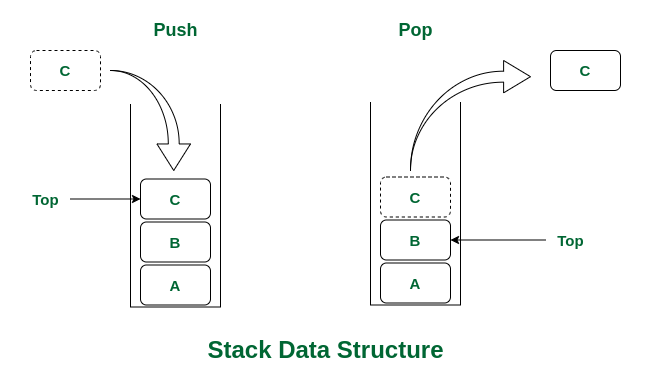
A Stack is a linear data structure that follows the LIFO principle: \(LIFO:Last-In, First-Out\)
This means:
An ADT specifies:
Example: ADT for a Stock Trading System
Data Stored: Buy and sell orders
Supported Operations
1
2
3
order buy(stock, shares, price)
order sell(stock, shares, price)
void cancel(order)
Error Conditions
A stack has one accessible end only, called the Top.
| Term | Meaning |
|---|---|
| Top | Position where elements are added and removed |
| Bottom | The first element added |
An Abstract Data Type (ADT) defines the behavior of a stack, independent of implementation.
| Operation | Description |
|---|---|
push(x) |
Insert element x onto the top |
pop() |
Remove and return the top element |
peek() / top() |
Return the top element without removing it |
is_empty() |
Check if the stack is empty |
size() |
Return the number of elements |
1
2
3
4
5
6
7
8
9
10
11
12
13
14
15
16
17
18
19
20
21
22
class Stack:
    def __init__(self):
        self.items = []

    def is_empty(self):
        return len(self.items) == 0

    def push(self, item):
        self.items.append(item)

    def pop(self):
        if self.is_empty():
            raise IndexError("Stack is empty")
        return self.items.pop()

    def peek(self):
        if self.is_empty():
            raise IndexError("Stack is empty")
        return self.items[-1]

    def size(self):
        return len(self.items)
1
2
3
4
5
6
7
8
9
s = Stack()

s.push(10)
s.push(20)
s.push(30)

print(s.pop())    # Output: 30
print(s.peek())   # Output: 20
print(s.size())   # Output: 2
| Operation | Time Complexity | Explanation |
|---|---|---|
push |
O(1) | Append to end of list |
pop |
O(1) | Remove from end |
peek |
O(1) | Direct index access |
is_empty |
O(1) | Length check |
Very efficient using Python lists.
What’s happen? When:
- Occurs when pushing onto a full stack (bounded stack)
- Occurs when popping from an empty stack
| Application | Description |
|---|---|
| Function calls | Call stack in memory |
| Undo / Redo | Text editors |
| Expression evaluation | Postfix / Prefix |
| Syntax checking | Parentheses matching |
| DFS | Graph traversal |
1
2
3
4
5
6
7
8
9
10
11
12
13
14
15
16
17
18
19
20
21
22
23
24
25
26
27
28
29
30
31
32
33
34
class BoundedStack:
    def __init__(self, capacity):
        if capacity <= 0:
            raise ValueError("Capacity must be a positive integer")

        self.capacity = capacity
        self.items = []

    def is_empty(self):
        return len(self.items) == 0

    def is_full(self):
        return len(self.items) == self.capacity

    def push(self, item):
        if self.is_full():
            raise OverflowError("Stack overflow: cannot push onto a full stack")
        self.items.append(item)

    def pop(self):
        if self.is_empty():
            raise IndexError("Stack underflow: cannot pop from an empty stack")
        return self.items.pop()

    def peek(self):
        if self.is_empty():
            raise IndexError("Stack is empty")
        return self.items[-1]

    def size(self):
        return len(self.items)

    def __str__(self):
        return f"Stack(bottom → top): {self.items}"
1
2
3
4
5
6
7
8
9
10
11
12
13
14
15
16
17
18
19
stack = BoundedStack(3)

stack.push(10)
stack.push(20)
stack.push(30)

print(stack)        # Stack(bottom → top): [10, 20, 30]
print(stack.peek()) # 30

# Stack overflow
# stack.push(40)    # OverflowError

print(stack.pop())  # 30
print(stack.pop())  # 20
print(stack.size()) # 1

# Stack underflow
# stack.pop()
# stack.pop()       # IndexError
| Operation | Time Complexity |
|---|---|
push |
O(1) |
pop |
O(1) |
peek |
O(1) |
is_empty |
O(1) |
is_full |
O(1) |
In many real-world service systems such as banks, public service centers, hospitals, and customer support offices, service requests are typically processed in a First In – First Out (FIFO) order.
Without a proper queue management mechanism:
Therefore, the problem is to design and implement a queue-based service management system that:
The system must operate in a console-based environment and must not use any database.
Simulate a service queue system that processes customers in First-In-First-Out (FIFO) order.
The system must support the following operations:
| Attribute | Data Type | Description |
|---|---|---|
| id | int | Customer identifier |
| name | string | Customer name |
| service_type | string | Type of service |
| arrival_time | int or float | Arrival time |
Input (input.txt)
Output (output.txt)
| Command | Condition | Output Format |
|---|---|---|
| ADD | Always | (No output) |
| SERVE | Queue not empty | ID: <id> Name: <name> Service: <service_type> |
| SERVE | Queue is empty | EMPTY |
| NEXT | Queue not empty | ID: <id> Name: <name> Service: <service_type> |
| NEXT | Queue is empty | EMPTY |
| COUNT | Always | <number_of_waiting_customers> |
| SERVED | Always | <total_customers_served> |
Input:
1
2
3
4
5
6
7
8
9
10
11
10
ADD 101 A Payment 12.5
ADD 102 B Registration 13.0
NEXT
SERVE
NEXT
SERVE
SERVE
COUNT
SERVED
NEXT
Output:
1
2
3
4
5
6
7
8
ID: 101 Name: A Service: Payment
ID: 101 Name: A Service: Payment
ID: 102 Name: B Service: Registration
ID: 102 Name: B Service: Registration
EMPTY
0
2
EMPTY
Step 1: Queue.py
1
2
3
4
5
6
7
8
9
10
11
12
13
14
15
16
17
18
19
20
21
22
class Queue:
    def __init__(self):
        self.items = []

    def is_empty(self):
        return len(self.items) == 0

    def enqueue(self, item):
        self.items.append(item)

    def dequeue(self):
        if self.is_empty():
            raise IndexError("Queue is empty")
        return self.items.pop(0)

    def peek(self):
        if self.is_empty():
            raise IndexError("Queue is empty")
        return self.items[0]

    def size(self):
        return len(self.items)
Step 2: Import Queue into templates
1
from queue import Queue
Step 3: Initialize in solve()
1
2
3
n = int(all_lines_of_input[0])
countServed = 0
queueTmp = Queue()
1
2
3
4
5
6
7
8
9
10
11
12
13
14
15
16
17
18
19
20
21
def solve():
    ...
    for i in range(1, n + 1):
        words = all_lines_of_input[i].rstrip("\n").split(" ")
        if words[0] == 'ADD':
            queueTmp.enqueue(ServeModel(words[1], words[2], words[3], words[4]))
        elif words[0] == 'NEXT':
            if queueTmp.is_empty():
                result_for_output += "Empty\n"
            else:
                result_for_output += queueTmp.peek().print() + "\n"
        elif words[0] == 'SERVE':
            if queueTmp.is_empty():
                result_for_output += "Empty\n"
            else:
                countServed += 1
                result_for_output += queueTmp.dequeue().print() + "\n"
        elif words[0] == 'COUNT':
            result_for_output += str(queueTmp.size()) + "\n"
        elif words[0] == 'SERVED':
            result_for_output += str(countServed) + "\n"
In many areas of computer science such as compilers, calculators, and programming language interpreters, expressions (arithmetic or logical) must be processed in a specific order.
However, expressions written in infix notation (e.g. 3 + 4 * 2) are not easy for computers to evaluate directly because operator precedence and parentheses must be handled correctly.
The problem is to design a system that:
The system must be implemented as a console-based program without using any external libraries for expression evaluation.
Given several infix expressions, perform the following tasks for each expression:
The program must use the Stack data structure for both conversion and evaluation.
Expressions may contain:
Input (input.txt)
Output (output.txt)
For each test case:
Input:
1
2
3
4
3
3 + (4 * 5)
10 + 2 * 6
(1 + 2
Output:
1
2
3
4
5
3 4 5 * +
23
10 2 6 * +
22
Error: Mismatched parentheses.
Step 1: Using stack.py
1
2
3
4
5
6
7
8
9
10
11
12
13
14
15
16
17
18
19
20
21
22
class Stack:
    def __init__(self):
        self.items = []

    def is_empty(self):
        return len(self.items) == 0

    def push(self, item):
        self.items.append(item)

    def pop(self):
        if self.is_empty():
            raise IndexError("Stack is empty")
        return self.items.pop()

    def peek(self):
        if self.is_empty():
            raise IndexError("Stack is empty")
        return self.items[-1]

    def size(self):
        return len(self.items)
Step 2: Update stack.py (make it safer & easier)
1
2
3
4
5
6
7
8
9
10
11
12
13
14
15
16
17
18
class Stack:
    def __init__(self):
        self.items = []

    def is_empty(self):
        return len(self.items) == 0

    def push(self, item):
        self.items.append(item)

    def pop(self):
        return self.items.pop() if not self.is_empty() else None

    def peek(self):
        return self.items[-1] if not self.is_empty() else None

    def size(self):
        return len(self.items)
Step 3: Write a function Simple Infix as Postfix in templates
1
2
3
4
5
6
7
8
9
10
11
12
13
14
15
16
17
18
19
20
21
22
23
24
25
26
27
28
29
30
31
32
33
34
35
36
37
38
39
40
41
42
43
44
45
46
47
48
49
50
51
52
53
54
55
56
57
58
59
60
61
def precedence(op):
    if op == '^':
        return 3
    elif op in ('*', '/'):
        return 2
    elif op in ('+', '-'):
        return 1
    return 0


def tokenize(expression):
    tokens = []
    i = 0
    n = len(expression)

    while i < n:
        if expression[i] == ' ':
            i += 1
            continue

        if expression[i].isdigit():
            num = []
            while i < n and expression[i].isdigit():
                num.append(expression[i])
                i += 1
            tokens.append(''.join(num))
            continue

        tokens.append(expression[i])
        i += 1

    return tokens


def infixToPostfix(expression):
    stack = Stack()
    output = []
    tokens = tokenize(expression)

    for token in tokens:
        if token.isdigit():
            output.append(token)

        elif token == '(':
            stack.push(token)

        elif token == ')':
            while not stack.is_empty() and stack.peek() != '(':
                output.append(stack.pop())
            stack.pop()  # bỏ '('

        else:  # operator
            while (not stack.is_empty() and
                   precedence(stack.peek()) >= precedence(token)):
                output.append(stack.pop())
            stack.push(token)

    while not stack.is_empty():
        output.append(stack.pop())

    return ' '.join(output)
Step 4: Simple Evaluate Postfix
1
2
3
4
5
6
7
8
9
10
11
12
13
14
15
16
17
18
19
20
21
22
23
def evaluatePostfix(expression):
    stack = Stack()
    tokens = expression.split()

    for token in tokens:
        if token.lstrip('-').isdigit():
            stack.push(int(token))
        else:
            b = stack.pop()
            a = stack.pop()

            if token == '+':
                stack.push(a + b)
            elif token == '-':
                stack.push(a - b)
            elif token == '*':
                stack.push(a * b)
            elif token == '/':
                stack.push(int(a / b))
            elif token == '^':
                stack.push(a ** b)

    return stack.pop()
Step 5. Very Clean solve()
1
2
3
4
5
6
7
8
9
10
11
12
13
14
15
16
17
18
19
20
21
22
def solve():
    ...
    n = int(all_lines_of_input[0])
    res = []

    for i in range(1, n + 1):
        words = all_lines_of_input[i].rstrip("\n")

        try:
            postfix = infixToPostfix(words)
            result = evaluatePostfix(postfix)

            if isinstance(result, str):
                res.append(result)
            else:
                res.append(postfix)
                res.append(str(result))

        except:
            res.append("Error: Mismatched parentheses.")

        result_for_output = "\n".join(res)