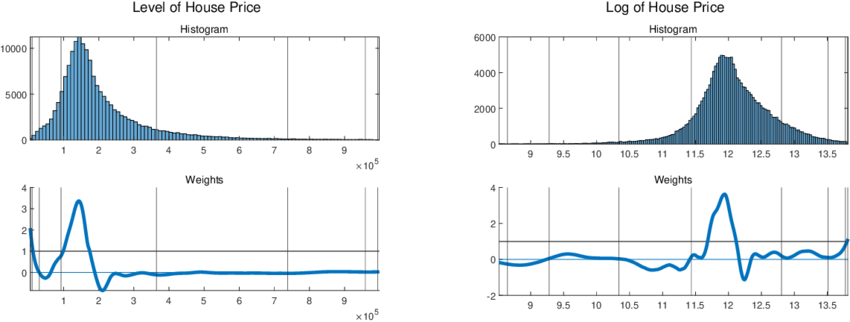
A data report communicates insights derived from data, not just numbers. A good report tells a logical, evidence-based story that supports decision-making.
| Section | Main Goal |
|---|---|
| Title & Introduction | Define context and purpose |
| Business Logic | Explain why the analysis matters |
| Data Summary | Describe the dataset |
| Group & Sort | Show data organization logic |
| Visualizations | Communicate insights visually |
| Drill Down | Explore details and exceptions |
| Conclusions | Provide insights and actions |
| References | Support transparency |
| Footnotes | Give credit and clarifications |
Set the context and tell the reader what the report is about and why it matters.
What to include
Title: House Price Prediction Analysis
Introduction:
Explain why the analysis exists from a business or real-world perspective.
What to include
Accurate house price prediction helps real estate agencies optimize pricing strategies and assists buyers in making informed investment decisions.
Help readers understand what data was used.
What to include
Import CSV to SQLite
1
2
3
4
5
6
7
8
9
10
11
12
13
14
15
16
17
18
19
20
21
22
23
24
25
26
27
28
29
30
31
32
33
34
35
36
37
38
39
40
import pandas as pd
import sqlite3

# ==============================
# CONFIGURATION
# ==============================
CSV_PATH = "housing.csv"
DB_PATH = "housing.db"
TABLE_NAME = "houses"

# ==============================
# READ CSV
# ==============================
df = pd.read_csv(CSV_PATH)

# ==============================
# CONNECT TO SQLITE
# ==============================
conn = sqlite3.connect(DB_PATH)

# ==============================
# WRITE TO SQLITE
# ==============================
df.to_sql(
    TABLE_NAME,
    conn,
    if_exists="replace",  # overwrite table if exists
    index=False
)

# ==============================
# VERIFY INSERT
# ==============================
cursor = conn.cursor()
cursor.execute(f"SELECT COUNT(*) FROM {TABLE_NAME}")
row_count = cursor.fetchone()[0]

print(f"Imported {row_count:,} rows into table '{TABLE_NAME}'")

conn.close()
Anlysis data:
1
2
3
4
5
6
7
8
9
10
11
12
13
14
15
16
17
18
19
20
21
22
23
24
25
26
27
28
29
30
31
32
33
34
35
36
37
38
39
40
41
42
43
44
45
46
47
48
49
50
51
52
53
54
55
56
57
58
iimport sqlite3

# ==============================
# CONFIGURATION
# ==============================
DB_PATH = "housing.db"
TABLE_NAME = "houses"
DATASET_NAME = "Housing market dataset"
TARGET_VARIABLE = "price"

# ==============================
# CONNECT TO DATABASE
# ==============================
conn = sqlite3.connect(DB_PATH)
cursor = conn.cursor()

# ==============================
# NUMBER OF RECORDS
# ==============================
cursor.execute(f"SELECT COUNT(*) FROM {TABLE_NAME}")
num_records = cursor.fetchone()[0]

# ==============================
# NUMBER OF FEATURES (COLUMNS)
# ==============================
cursor.execute(f"PRAGMA table_info({TABLE_NAME})")
columns_info = cursor.fetchall()
num_features = len(columns_info)

# ==============================
# IDENTIFY NUMERIC VS CATEGORICAL
# ==============================
numeric_types = ("INT", "INTEGER", "REAL", "FLOAT", "DOUBLE")
numeric_count = 0
categorical_count = 0

for col in columns_info:
    col_type = col[2].upper()
    if any(t in col_type for t in numeric_types):
        numeric_count += 1
    else:
        categorical_count += 1

# ==============================
# OUTPUT DATA SUMMARY
# ==============================
print(f"Dataset: {DATASET_NAME}")
print(f"Records: {num_records:,} properties")
print(
    f"Features: {num_features} variables "
    f"({numeric_count} numeric, {categorical_count} categorical)"
)
print("Target variable: House price")

# ==============================
# CLOSE CONNECTION
# ==============================
conn.close()
Explain how data was aggregated or organized to reveal patterns.
What to include
Data was grouped by district and sorted by average house price to identify high-value and low-value areas.
Trong pandas, grouping variables được truyền vào groupby().
1
2
3
df.groupby("district")
df.groupby("year")
df.groupby(["district", "house_type"])
1
2
3
4
5
6
7
avg_price_by_district = (
    df.groupby("district")["price"]
      .mean()
      .sort_values(ascending=False)
)

avg_price_by_district.head()
- Group by: district
- Metric: average price
- Sort: descending -> tìm khu vực giá cao
1
2
3
4
5
6
7
8
9
10
11
district_summary = (
    df.groupby("district")
      .agg(
          avg_price=("price", "mean"),
          median_price=("price", "median"),
          num_properties=("price", "count")
      )
      .sort_values(by="avg_price", ascending=False)
)

district_summary.head()
1
2
3
4
5
6
7
8
9
10
11
12
top_5_districts = district_summary.head(5)
top_5_districts


Hoặc gộp trực tiếp:

top_5_districts = (
    df.groupby("district")["price"]
      .mean()
      .sort_values(ascending=False)
      .head(5)
)
1
2
3
4
5
6
7
price_trend_by_year = (
    df.groupby("year")["price"]
      .mean()
      .sort_index()
)

price_trend_by_year
- Sort theo năm tăng dần
- Dùng cho phân tích xu hướng
1
2
3
4
5
6
7
8
9
10
district_type_summary = (
    df.groupby(["district", "house_type"])
      .agg(
          avg_price=("price", "mean"),
          num_properties=("price", "count")
      )
      .sort_values(by="avg_price", ascending=False)
)

district_type_summary.head()
Make insights easy to understand and compare.
What to include
1
2
3
4
5
6
7
8
9
10
11
import matplotlib.pyplot as plt
import seaborn as sns

plt.figure(figsize=(8, 5))
sns.histplot(df['price'], bins=30, kde=True)

plt.title('Distribution of House Prices')
plt.xlabel('House Price')
plt.ylabel('Frequency')

plt.show()
1
2
3
4
5
6
7
8
9
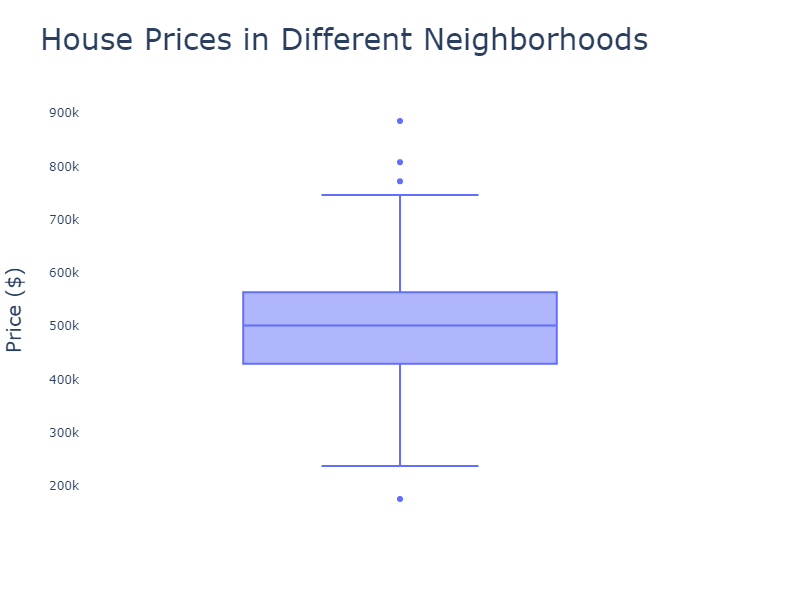
plt.figure(figsize=(10, 6))
sns.boxplot(x='district', y='price', data=df)

plt.title('House Prices by District')
plt.xlabel('District')
plt.ylabel('House Price')
plt.xticks(rotation=45)

plt.show()
1
2
3
4
5
6
7
8
9
10
11
12
13
14
15
16
17
18
19
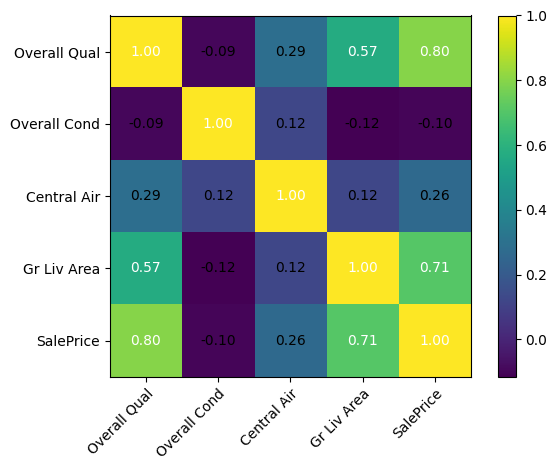
import numpy as np

# Select numeric columns only
numeric_df = df.select_dtypes(include=np.number)

# Compute correlation matrix
corr_matrix = numeric_df.corr()

plt.figure(figsize=(10, 8))
sns.heatmap(
    corr_matrix,
    annot=True,
    fmt=".2f",
    cmap="coolwarm",
    square=True
)

plt.title('Correlation Heatmap of Numeric Features')
plt.show()
Allow deeper exploration of specific segments or anomalies.
What to include
After identifying District A as having the highest average prices, a drill-down analysis was conducted by house type and size.
Drill down analysis is the process of:
moving from high-level summaries to detailed views in order to understand why certain segments show unusual patterns or anomalies.
1
2
3
4
All houses
 └── District
      └── House type
           └── Individual properties / Outliers
Step 1: Identify Anomalies at a High Level
Question: Which groups show unusually high or low values?
1
2
3
4
5
6
7
8
9
10
district_summary = (
    df.groupby("district")
      .agg(
          avg_price=("price", "mean"),
          count=("price", "count")
      )
      .sort_values("avg_price", ascending=False)
)

district_summary.head()
High-level insight: District A has the highest average house price.
Step 2: Subgroup Analysis
Question: Within District A, which subgroups drive the high prices?
1
2
3
4
5
6
7
8
9
10
11
12
13
target_district = district_summary.index[0]

district_drill = (
    df[df["district"] == target_district]
      .groupby("house_type")
      .agg(
          avg_price=("price", "mean"),
          count=("price", "count")
      )
      .sort_values("avg_price", ascending=False)
)

district_drill
Intermediate insight: Apartments contribute most to the high prices in District A.
Step 3: Deep Drill Down (Outliers and Special Cases)
1
2
3
4
5
6
7
8
9
10
q1 = df["price"].quantile(0.25)
q3 = df["price"].quantile(0.75)
iqr = q3 - q1

outliers = df[
    (df["price"] < q1 - 1.5 * iqr) |
    (df["price"] > q3 + 1.5 * iqr)
]

outliers.head()
1
2
district_outliers = outliers[outliers["district"] == target_district]
district_outliers.sort_values("price", ascending=False).head()
Detailed insight: A small number of luxury properties significantly inflate the average price.
Translate analysis into actionable insights.
What to include
Larger living area and location are the strongest predictors of house price. Recommendation: prioritize these features in pricing models and valuation tools.
Step 1: Summarize Key Findings
(What happened?)
Guidelines
Example
Step 2: Explain Business or Practical Implications
(So what?)
Translate each finding into real-world meaning.
Guidelines
Example
Step 3: Provide Clear Recommendations
(What should be done?)
Convert insights into specific, actionable actions.
Guidelines
Example
Step 4: State Limitations of the Analysis
(What should we be careful about?)
Acknowledge important constraints to ensure transparency and credibility.
Guidelines
Example
Ensure credibility, transparency, and reproducibility.
What to include
1
2
3
4
References
[1] Author, A. (Year). Title. Source.
[2] Kaggle. (2023). Housing Prices Dataset. https://www.kaggle.com/
[3] ...